

A hooded figure browsing on a laptop showing a padlock over a globe

Anonymous browsing

Anonymous View, for any website

Open a page and the site meets a browser that is not yours. Different address, different operating system, different browser, and no canvas fingerprint worth reading. Free, with nothing to install.

  • No account
  • Nothing to install
  • 6 countries
  • Free

Proof

The same fingerprint test, twice

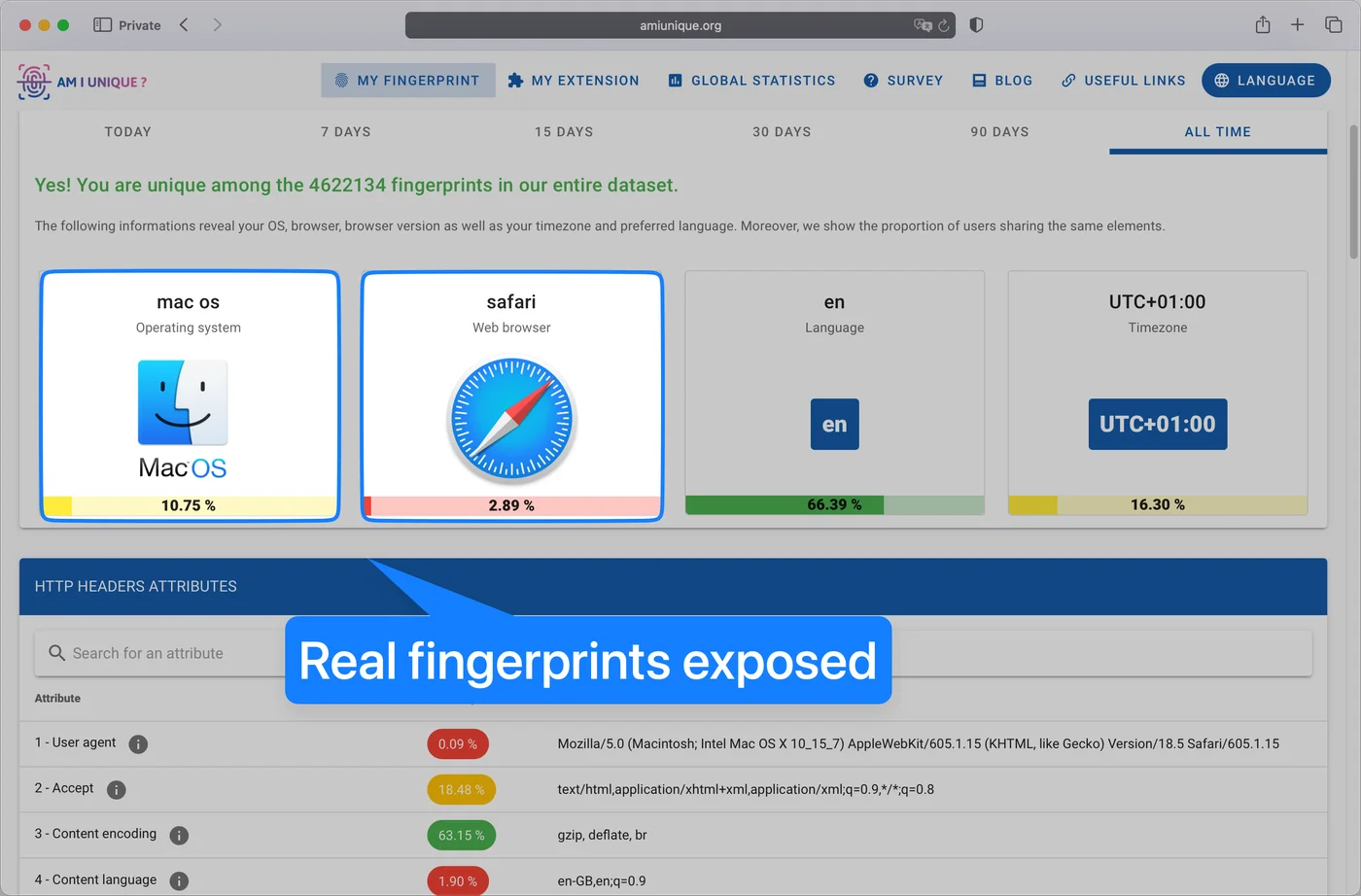
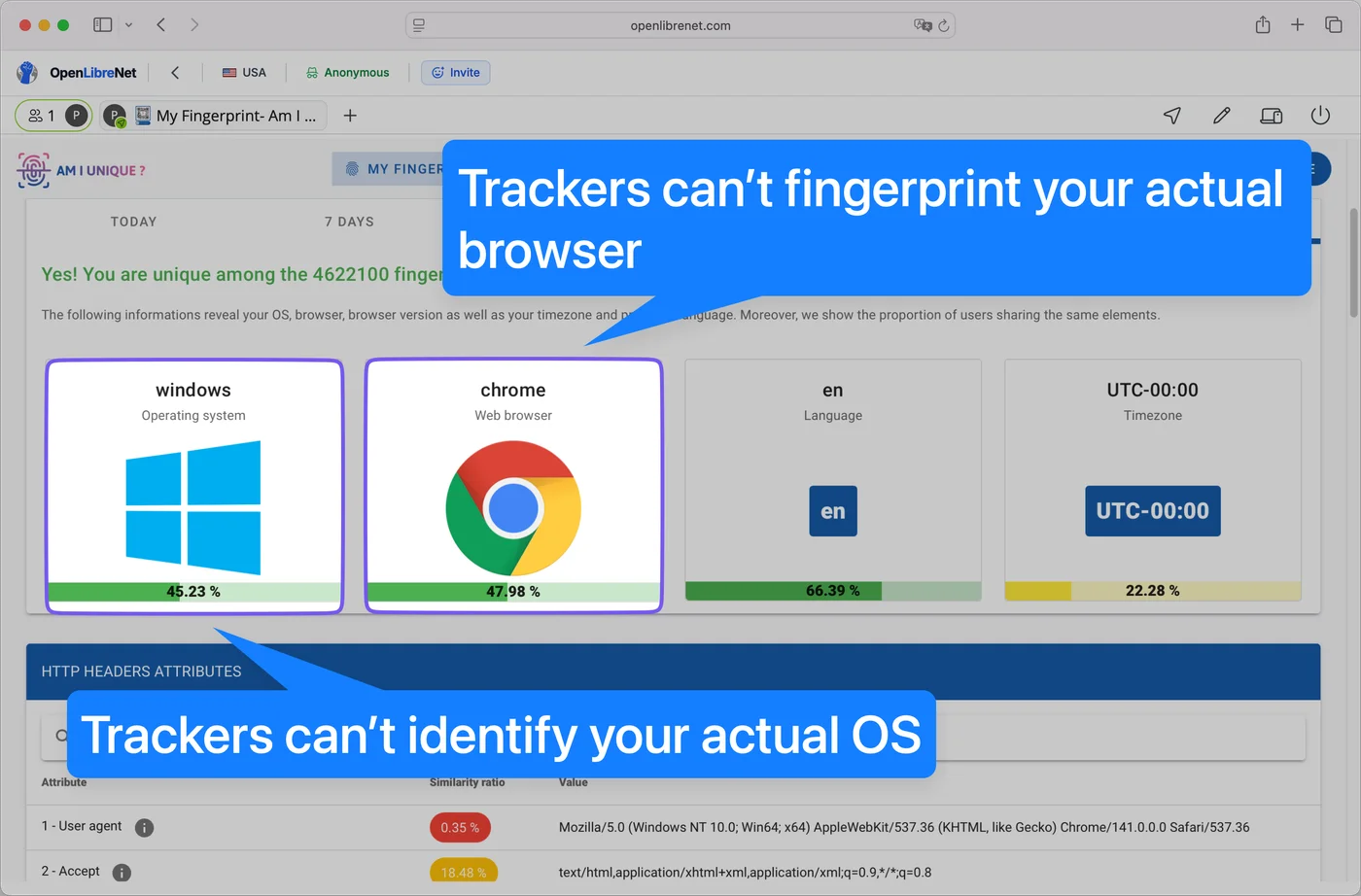
amiunique.org reports what a browser gives away. On the left, a private window straight from a Mac. On the right, the same test opened in Anonymous View.

Private window, directReal values
The amiunique.org fingerprint test in a private Safari window, reporting mac os, safari and UTC+01:00
Anonymous ViewSubstituted values
The same amiunique.org test opened through OpenLibreNet, reporting windows, chrome and UTC-00:00
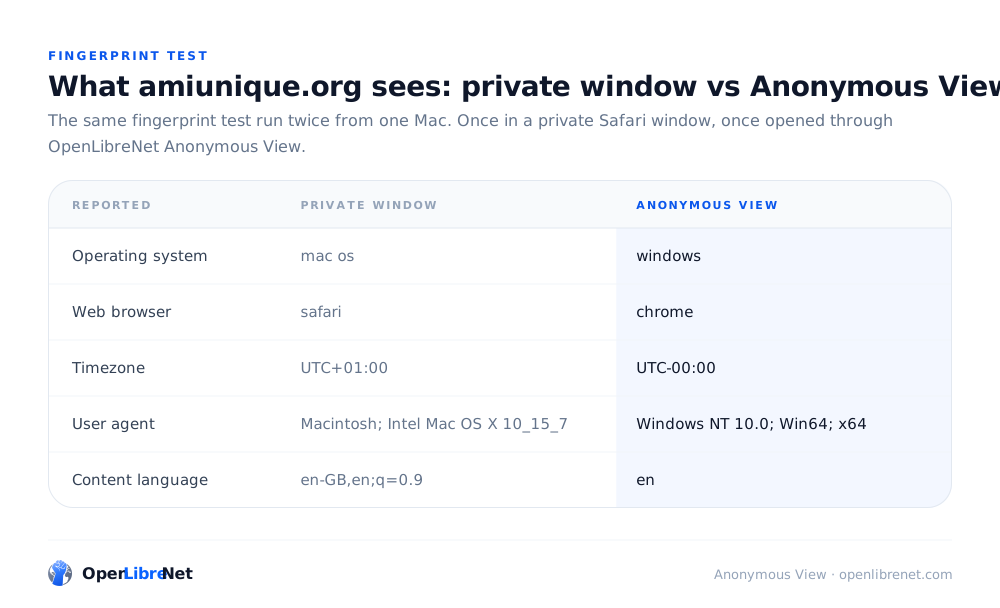
Reported Private window Anonymous View
Operating systemmac oswindows
Web browsersafarichrome
TimezoneUTC+01:00UTC-00:00
User agentMacintosh; Intel Mac OS X 10_15_7Windows NT 10.0; Win64; x64
Content languageen-GB,en;q=0.9en

Scroll the table sideways for both readings

What changed, stated carefully

Read the right-hand shot closely and the test still calls that fingerprint distinctive. It will. Anonymous View does not hide you in a crowd of identical browsers, and any service claiming it does is worth a second look.

What it stops is the fingerprint describing you. Every value on the right belongs to a browser in a data centre that you will never use again: not your machine, not your operating system, not your clock, not your address. A tracker can record it perfectly and still hold nothing that points back to the laptop you opened the tab on.

Definition

What Anonymous View is

Anonymous View opens the page you asked for in a browser running on a server in the country you picked, then hands the rendered page to your tab. The site is visited by that browser, so everything it can measure belongs to that browser: its address, its operating system, its fonts, its clock. Your own browser never contacts it.

Not a private tab

A private window forgets your history when you close it. The site you visited still saw your address, your browser and your fingerprint while you were there.

Not a VPN

A VPN moves your traffic to another exit and stops. You still browse with your own browser, so the fingerprint that identifies you travels with you.

Not a screenshot

What arrives is a live page: links work, forms work, text is selectable. It renders in your tab rather than streaming as video from somewhere else.

The full path a page takes is written up in how it works .

Fingerprinting

Six ways a site works out who you are

Trackers rarely rely on one signal. They collect several weak ones and combine them into something stable enough to recognise you on the next site. Here is each technique, and what it comes back with in Anonymous View.

Your IP address

The oldest signal there is. It gives a site your rough location, your internet provider, and a handle stable enough to tie visits together across days.

Replaced. The site records an address in the country you picked, which has no relationship to yours.
Canvas and WebGL

A page draws an invisible shape and reads the pixels back. Tiny differences between graphics cards, drivers and installed fonts make that readback stable and near-unique to your machine.

Blocked. Pages cannot read the result of canvas drawing operations, so there is no stable value to record.

User agent and client hints

Your browser announces its exact version, your operating system build and, through the Sec-CH-UA headers, more detail on request. Rare combinations narrow a crowd fast.

Masked. The navigator object and those headers carry common values rather than yours, as the test above shows.

Hardware profile

Processor count, memory, screen dimensions, battery level. None identifies you alone. Together they describe a specific machine well enough to recognise it again.

Withheld. Detailed device information is kept back from the page rather than answered honestly.

Clock and timezone

Reading the local clock gives away your timezone, and the exact offset from real time is itself a weak identifier that follows a laptop between networks.

Hidden. Sites cannot check the local time on your device, which is why the two runs above report different zones.

WebRTC and beacons

WebRTC can expose a real address even behind a VPN, which is how plenty of leak tests catch people out. Beacon requests fire quietly as a page unloads, after you think you have left.

Switched off. WebRTC is disabled outright and beacon POSTs are stopped before they leave.

Alternatives

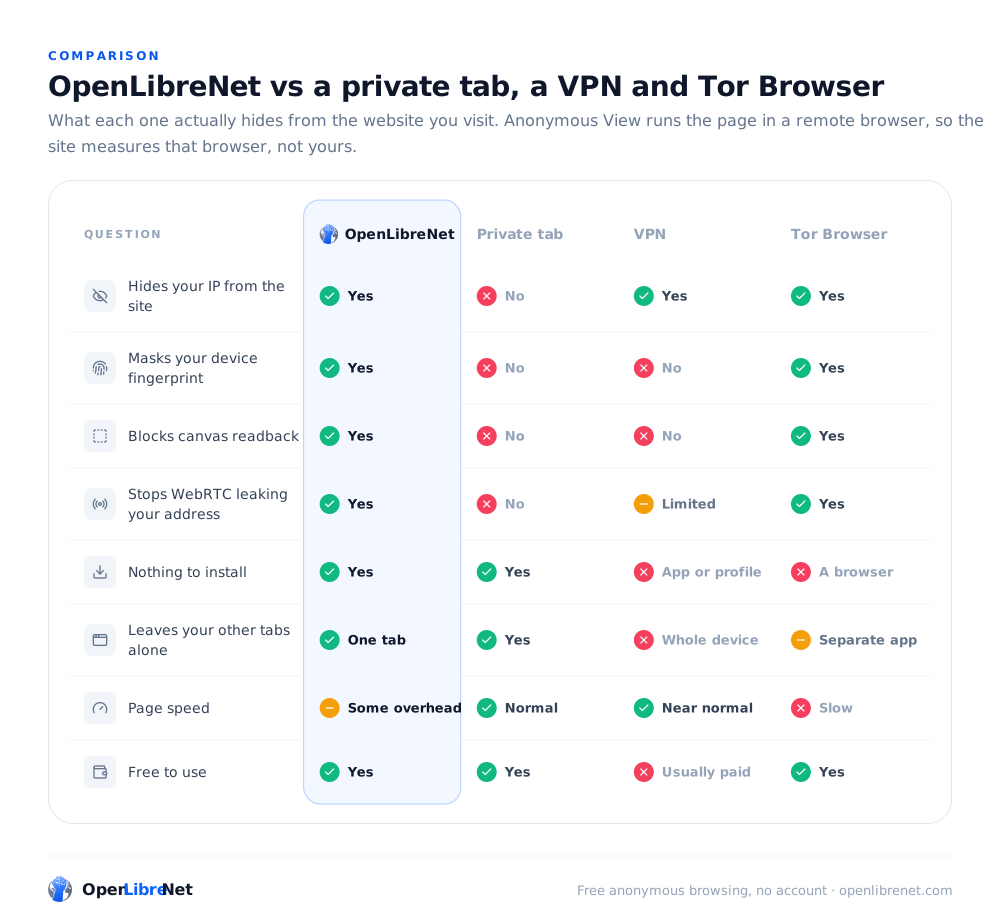
Anonymous View next to the usual three

Each of these solves a different problem, and one of the others is sometimes the better pick. This is what each actually does.

Question
OpenLibreNet
Private tab
VPN
Tor Browser
Hides your IP from the site
Masks your device fingerprint
Blocks canvas readback
Stops WebRTC leaking your address
Nothing to install
Leaves your other tabs alone
Page speed
Free to use

Scroll the table sideways for every column

Reach for a VPN

When every app on the machine needs to be somewhere else, not just one tab, or when you want your traffic hidden from the network you are sitting on.

Reach for Tor

When the risk is serious enough that slow pages are a fair trade, and when the people you are hiding from have real resources.

Reach for Anonymous View

When you want to open one page without handing over a fingerprint, from a country of your choosing, on a machine where you cannot install anything.

When to use it

Worth opening a clean browser for

Situations where the browser you use every day is the wrong tool, mostly because of what it already knows about you.

See results the way a stranger sees them

Search rankings, recommendations and product listings get shaped by everything a site already knows about you. A browser with no history behind it shows you the unpersonalised version.

Open a link you were not expecting

The page loads in a browser that is not your machine and holds none of your accounts. Anything hostile on it is attacking a container that gets destroyed a minute later.

Check what your own site collects

Load your product as a first-time visitor with no cookies and no profile, and watch which trackers fire, which banners appear, and what a genuinely new user is shown.

Read around a subject quietly

Researching a medical question, a legal problem or a competitor tends to follow you around in adverts for weeks. Reading it in a session that gets thrown away breaks that link.

Use a computer that is not yours

A library machine, a hotel desk, a borrowed laptop. Pages you open live in the remote session rather than in that machine, and you cannot install a VPN on it anyway.

Test a signup or paywall as a new user

Free trials, first-visit offers and metered paywalls all read your cookies to decide what you get. A fresh browser every time is the only reliable way to see the new-user path.

FAQ

Anonymous View, answered

What it hides, what it does not, and what it costs.

What is Anonymous View?

Anonymous View opens a website in a browser running on a server in the country you choose, then delivers the rendered page to your tab. The site is visited by that browser rather than yours, so the address, operating system, fonts and clock it can measure all belong to a machine that is not yours. There is no account, nothing to install, and it is free.

Is it the same as incognito or private browsing?

No. A private window changes what your own computer remembers after you close it. It changes nothing about what the website sees while you are there: your address, your browser version and your fingerprint reach the site exactly as they would in a normal tab. Anonymous View works on the other side of that, at what the site receives.

Will my fingerprint be unique in Anonymous View?

Quite possibly, and that is fine. The goal is not to look identical to thousands of other people. It is that the fingerprint a site records describes a disposable browser in a data centre rather than your machine, so nothing it collects leads back to you or joins up with what it collected last week.

Does it hide my browsing from my network or internet provider?

Not the way a VPN does. The connection from your browser to us is encrypted, so a network you are sitting on sees a connection to OpenLibreNet rather than the page inside it, though it can still see that you connected here. Only the tab you opened travels this way. Everything else on the machine keeps using its normal connection.

Is Anonymous View free?

Yes. No account, no trial and no card. Surfly build the session technology underneath it and sponsor the service, so there is no paid tier being held back from you.

Will I stay signed in to websites?

No. Every session starts as a blank browser and is destroyed when you close it, cookies included, so nothing carries between sessions. Signing into an account during a session also tells that account who you are, which no amount of fingerprint masking changes.

Can a website still block me?

Some can. A few sites work hard to refuse rendering anywhere other than their own tab, and others treat unfamiliar traffic with suspicion and ask for a captcha. Switching to a different region clears it often enough to be worth trying.

Does it work on a phone?

Yes, in the mobile browser you already have. There is no app, and nothing to configure on the device.

Run the test yourself

Open amiunique.org in Anonymous View and compare it against the same page in your own browser. It takes about a minute and costs nothing.

Start browsing